
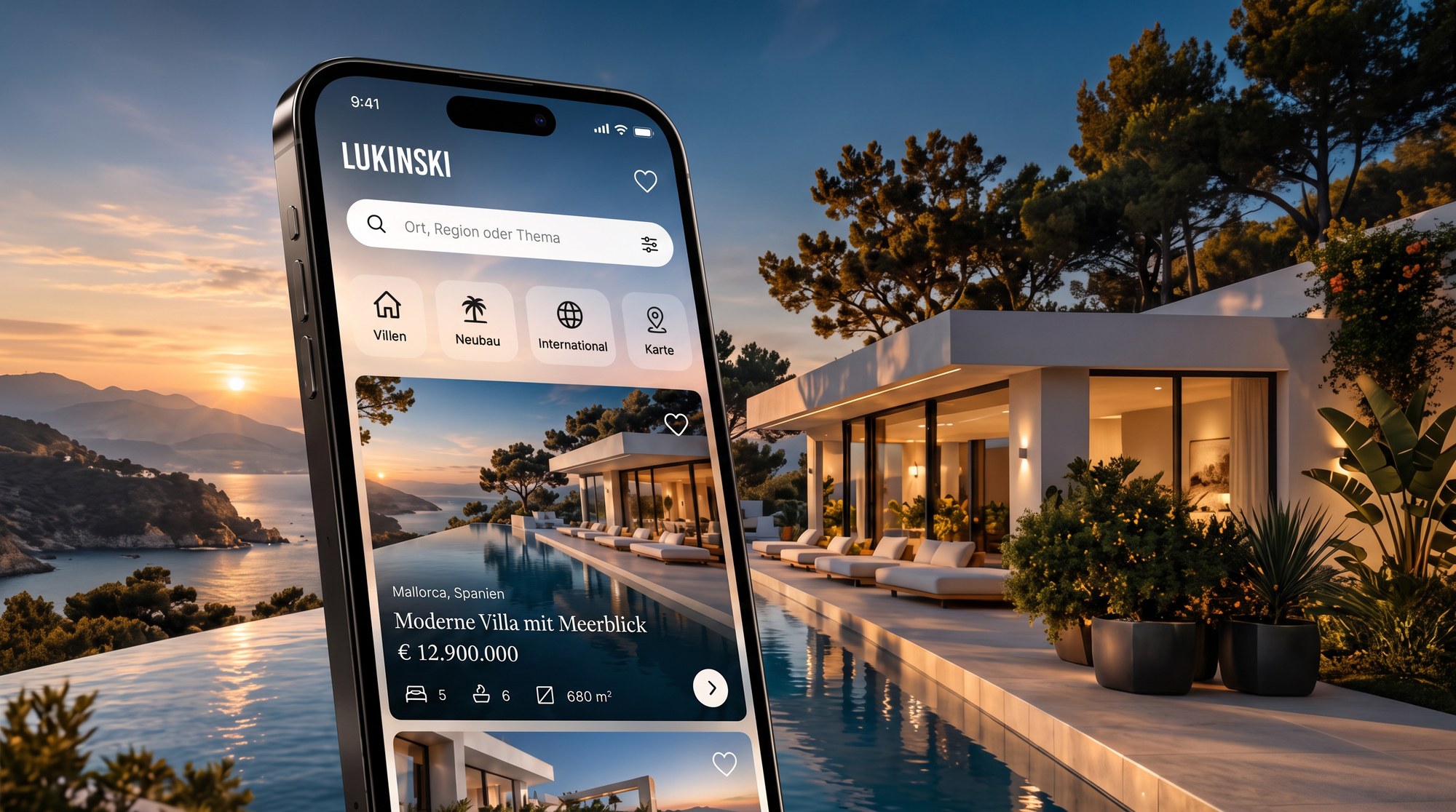
Lukinski App: Search, Compare and Save Luxury Villas Worldwide – Now for iPhone and Android
More than 60 villas in Ibiza, Marbella, Los Angeles and other top locations – now always with you: the new Lukinski app brings our villa portal to your phone. Search, filter, explore the world map, compare and save – simple, fast and without detours. Whether iPhone or Android, the app fits a life between meetings, airports and weekends.
What the Lukinski app can do at a glance
The app is built for one job: finding exceptional properties without clicking through menus. Five areas – Discover, Properties, Map, Wishlist and More – get you where you want in a single tap. Here is what is inside:
- Villas and luxury properties worldwide, updated continuously
- Search by place, region, country or topic
- Filters for price, bedrooms and property type
- World map with price labels, clusters and a results list
- Detail pages with facts, highlights, location and similar properties
- Wishlist, comparison of up to three properties and direct enquiry
- Nine languages plus light and dark design

The key features in detail
Discover: the home screen for villa lovers
The home screen is themed “Exceptional villas worldwide”. It shows selected properties, location chips such as Ibiza, Marbella and Los Angeles, and four shortcuts: properties, villas, locations and magazine. Below you find new listings, top properties and destinations. It feels like a magazine, not a list desert.
Properties: filter, sort, compare
In the Properties area you pick countries by chip – for example Spain or the USA – and immediately see how many villas are available there. The “Recommended” sorting puts our favourites first, or you can sort by price. One tap switches between card view and map. Active filters stay visible as a bar and can be removed one by one.
Map: find villas where you are looking
The world map shows properties as price labels and groups nearby locations into clusters. Move the map and tap “Search this area”: the results list slides up like a sheet. That makes the app just as good for a targeted search on the Costa del Sol as for finding out what is available in Los Angeles.
Property details: everything important, nothing superfluous
Every villa has its own detail page with price, rooms, bathrooms and living space, a list of highlights, the description, a mini map and similar properties. Through the enquiry sheet you reach our team directly – discreetly and without a form marathon.
An app for people with little time and high standards: few taps, clear information, discreet enquiry.
Wishlist and optional account
The heart icon puts any villa on your wishlist. Without an account it stays on your device. If you like, create a free account with your email address and a password, confirm it by link, and your wishlist is synced across all your devices. An account is never required.


Nine languages, light and dark design
The app speaks German, English, French, Spanish, Italian, Dutch, Russian, Turkish and Chinese. The language is chosen automatically to match your device and can be changed at any time. There is a light and a dark design – depending on whether you search at the breakfast table or in the evening on the plane. The app works without cookie banners and without advertising.

More than villas: private jets, rentals, acquisitions
Under “More” you go deeper into the world of Lukinski. There you will find, among others:
- Book a private jet – charter flights through the network of our sister project
- Rent – helicopter, yacht and sports car
- Acquisition – we buy properties directly
- Price atlas – property prices by city and location
- Partners – agents who show their properties with us
Features overview
| Area | What you can do |
|---|---|
| Discover | Selected villas, location chips, shortcuts |
| Properties | Pick countries, filter, sort, list or map |
| Map | World map, clusters, “Search this area” |
| Wishlist | Collect favourites, optionally sync with an account |
| More | Private jet, rentals, acquisitions, price atlas, language, design |
How to download the Lukinski app
- iPhone: Open the App Store and search for “Lukinski Villas” – or get the app directly in the App Store.
- Android: Open the Google Play Store and search for “Lukinski Villas” – here is the Play Store search.
- Without download: Open app.lukinski.de in your browser and add the page via “Add to Home Screen”.
- Get started: Open the app, check the language and save your first villa. You do not need an account for that.
Frequently asked questions about the Lukinski app
Do I need an account?
No. Search, filters, map and wishlist work without an account. An account only makes sense if you want to use your wishlist on several devices.
Which properties does the app show?
Currently more than 60 villas and luxury properties, including Ibiza, Marbella and Los Angeles. The selection keeps growing, also through partners on site.
How do I enquire about a villa?
On the detail page tap “Enquire”, add your contact details and send the message. Our team will get back to you personally and discreetly.
I am an agent. Can I show my properties?
Yes. Listing is free for partners, and our team takes care of a weekly sync with your website. You will find all details on the partner page.
Get started: Get the Lukinski app in the App Store or browse the villa portal first.

Rental Prices 2026: Why Tenants in Munich, Berlin and Frankfurt Keep Paying More

Real Estate Investment 2026: Why 84 Percent of Investors Are Betting on Residential Property

Tenant satisfaction at LEG Wohnen: How LEG keeps its tenants happy

Living in Maxvorstadt (Munich): Buy & Rent Flats and Properties – Popular Streets, Prices per Square Metre & Co.

Book a Private Jet: Process, Aircraft Types, Costs and Charter Services Explained
Real Estate App: The Best Finance and Investment Calculators – Now for iOS and Android